
Your palette, where you already look for colors.
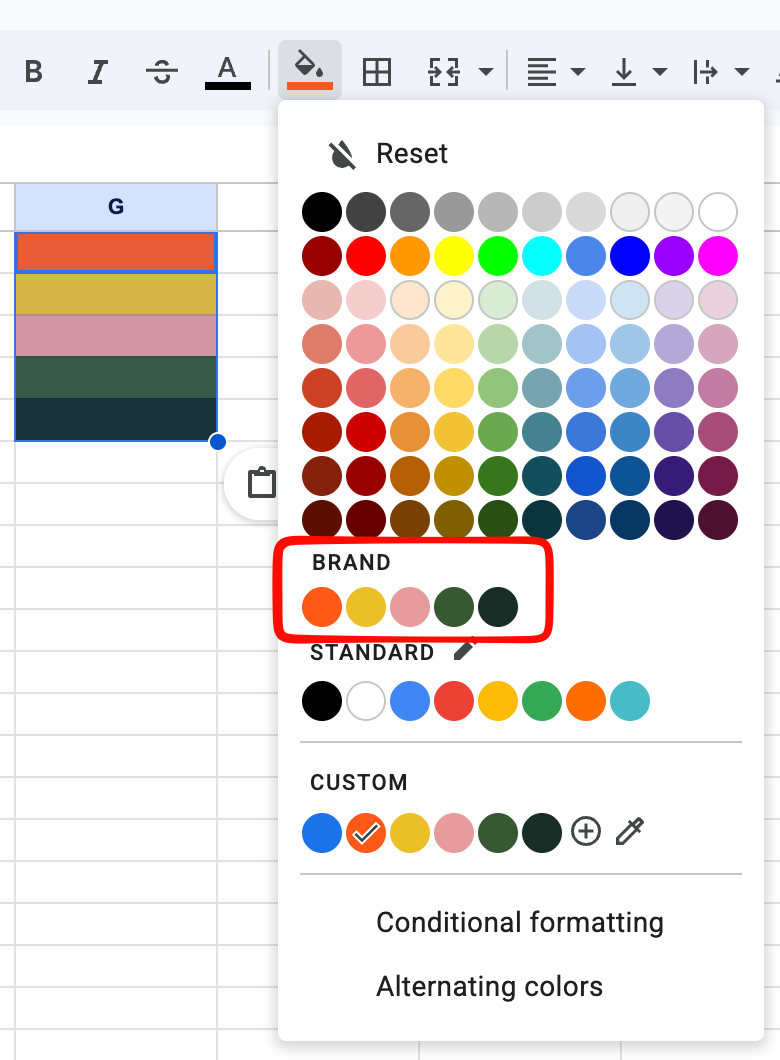
A Brand row in the real picker
Your colors appear inside Google's own fill, text, and border menus in Docs, Sheets, and Slides. Not a side panel, not a hex code pasted from a notes app. The row is simply there when you open the picker.
One click to apply
Clicking one of your swatches applies it through Google's own controls, so the result is exactly what Google would have done with a built in color.
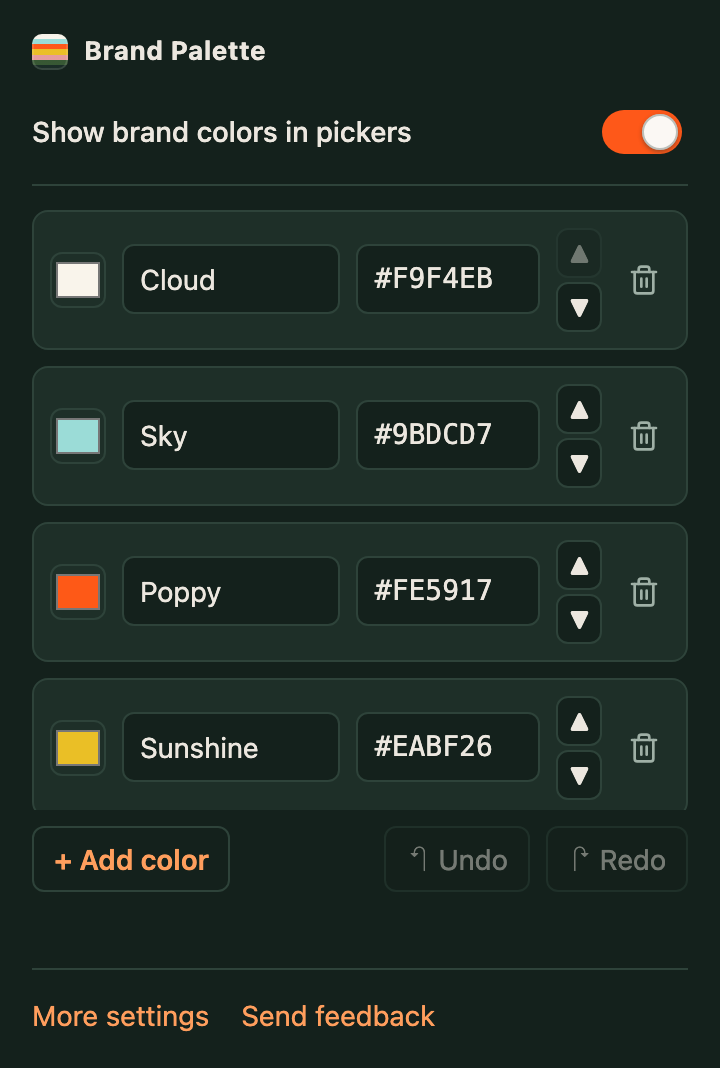
Edit from the toolbar
Click the extension icon for a quick editor. Add, rename, reorder, and remove colors with undo and redo. Changes save on their own and show up the next time a picker opens, with no page reload.
Eyedropper and hex
Pick a color visually, type a hex value, or use the eyedropper to grab a color from anything on your screen.
Import and export as text
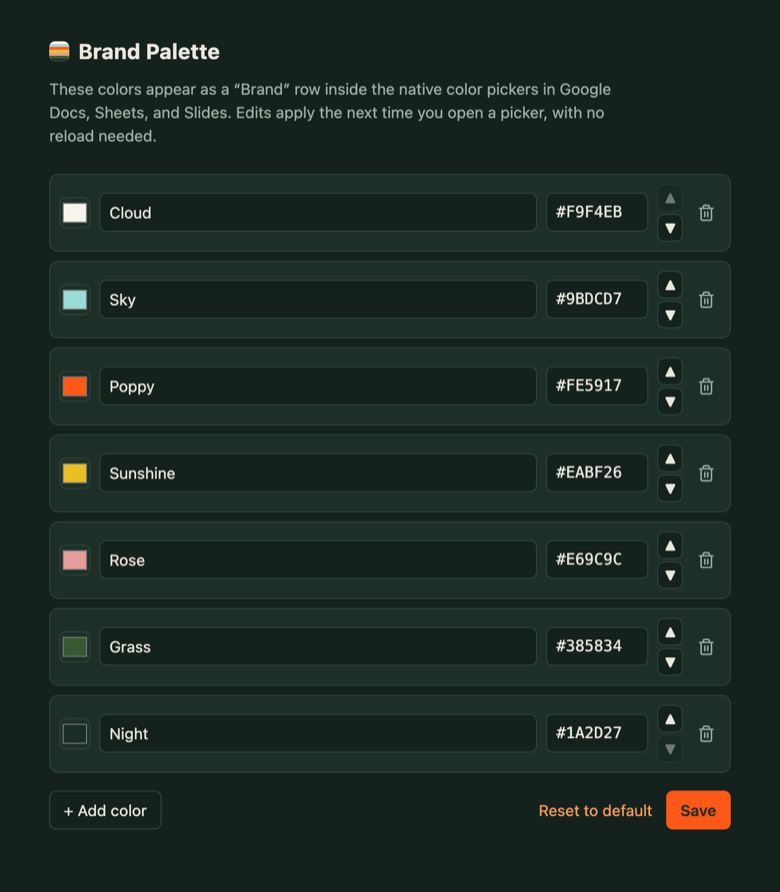
The settings page moves a whole palette as plain text, one color per line. Sending a palette to anyone, a collaborator, a client, a classroom, is copy and paste.
An icon that wears your colors
The toolbar icon paints itself from your palette's leading colors and repaints when the palette changes, so you can see at a glance which palette you are on. Light and dark appearance, or follow your system setting.
Anyone with colors they keep retyping.
There is nothing business shaped about a palette. If you reach for the same set of colors more than once, this puts them where you already look for colors. No company, no brand guidelines, and no team required.
- Designers and illustrators working a studio's house colors, or a different palette per client.
- Anyone building decks, reports, or one pagers who is tired of pasting the same six hex codes.
- Teachers and students on a school's colors, or a course's colors.
- Organizers, clubs, and volunteers keeping a newsletter or a poster consistent.
- Hobbyists with a palette they simply like, saved once instead of looked up every time.
- And yes, teams with real brand guidelines. An administrator can push one palette to everyone.
Three screens, and one of them is Google's.
Install, paste your hex codes, forget it exists.
Install
One click from the Chrome Web Store. No account, no sign in, no API key. Pin it from the puzzle piece menu so the editor is one click away.
Enter your colors
Type or paste your hex codes and name them. Already have the palette written down somewhere? Import the whole list at once.
Open any picker
Open a Doc, Sheet, or Slide and click any color menu. The Brand row is at the top. In Slides, select a shape or text box first, because Google hides the color buttons until something is selected.
One palette, pushed to everyone.
Working on your own? Skip this; nothing above depends on it. Where there is an organization, an administrator can roll the extension out from the Google Admin console with the shared palette already attached, so nobody types a hex code at all. No server to host and nothing for anyone to install by hand. Step-by-step instructions are on the admin setup page.
- Add the extension from the Chrome Web Store on the Admin console's Apps and extensions page, then force install it for the organizational units you choose.
- The palette rides along as extension policy. People open a picker and the shared colors are already in it.
- Publish several named palettes if different teams, brands, or sub-brands work from different sets.
- Optionally enforce the palette, so the shared colors stay intact and no one can edit them. Staff can still choose palettes of their own.
- Personal palettes are kept either way. Enforcement governs the shared colors, not everything a person has saved.
It never reads your documents.
The extension touches the color picker markup to add and apply swatches. That is the whole surface. There is no analytics, no account, no ads, and nothing to pay for. On a default install it makes no network requests at all.
- No tracking and no analytics of any kind. Nothing about your activity is recorded or sent.
- Document content is never read and never transmitted. Your documents stay in your browser.
- Permissions are storage, alarms, and access to the three Google editor pages. Nothing else.
- If something breaks, the extension tells you and lets you decide whether to send a report by email. Nothing is ever sent on its own.
- Read the full privacy policy →
The honest FAQ.
- Which apps does it work in?
- Google Docs, Google Sheets, and Google Slides, on the fill, text, and border color pickers. It runs only on those editor pages and nowhere else on the web.
- Do I need an account?
- No. There is no sign in, no server, and nothing to configure beyond your own colors. The palette lives in your browser.
- Do I need a company or a brand to use this?
- No. It works the same for a studio's house colors, a school's colors, a client's palette, or six colors you just happen to like. The row inside Google's picker is labelled Brand because that is the word most people search for, but the extension has no idea what your colors are for.
- Does it cost anything?
- No. It is free, with no subscription, no ads, and no paid tier.
- Can a group share one palette?
- Two ways. Anyone can export a palette as plain text and send it, and the other person imports it in one paste. Where there is a Workspace administrator, they can deploy the extension from the Google Admin console with the palette attached as policy, and optionally enforce it. See the For teams section above.
- Does it change how a color is applied?
- No. Clicking one of your swatches goes through Google's own controls, so it behaves exactly like a color you picked from Google's own grid.
- What happens if Google changes its pickers?
- The Brand row can stop appearing until the extension is updated to match. Use Send feedback in the popup to report it, and it gets fixed in a release.
- Can I turn it off without uninstalling?
- Yes. One switch in the toolbar popup hides the Brand row and gives you the stock pickers back. Your palette is kept.